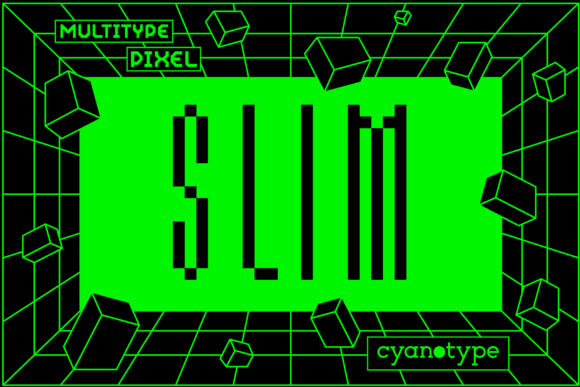
MultiType Pixel Slim for Modern Web Design
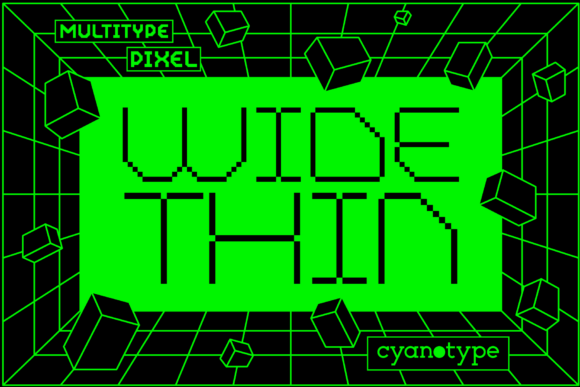
I was working on a rebrand for a creative portfolio site last week, and I needed a font that would stand out but still feel professional. That’s when I came across MultiType Pixel Slim. It immediately caught my eye with its pixelated, distorted look—something fresh and different from the usual sans serif or serif fonts.
MultiType Pixel Slim is a display font with a unique, pixelated design that gives it a digital, retro aesthetic. It feels like something you’d see in an early video game or a tech-inspired branding project. The font has a slim profile, which makes it versatile for various web elements without overwhelming the layout.
One of the first places I tested MultiType Pixel Slim was in the hero section of the portfolio site. I used it for the main headline over a dark image background. The contrast between the pixelated text and the deep tones of the image worked really well. It felt bold and attention-grabbing, which is exactly what a hero section needs to do.
I also tried using it in smaller sections, like call-to-action buttons and section headings. It worked best when used sparingly. For example, pairing it with a clean sans serif font like Montserrat for body copy helped maintain readability while keeping the overall design cohesive.
When designing for mobile, I noticed that MultiType Pixel Slim maintained its legibility even at smaller sizes. This is important because many users access websites from their phones, and readability on small screens can be tricky. I made sure to test the font across different screen sizes and found that it scaled well without losing its character.
Another thing I appreciated about MultiType Pixel Slim was its PUA encoding. This allowed me to use special characters and symbols that added a little extra flair to the design. It was especially useful for adding decorative accents to headers and promotional banners.
For the portfolio site, I used MultiType Pixel Slim in several key areas: the main headline, project titles, and a few decorative elements in the footer. I avoided using it for long paragraphs since it’s a display font and not optimized for large blocks of text. Instead, I reserved it for short, impactful phrases that needed to stand out.
I also considered how the font would affect the brand’s visual identity. The pixelated style gave the site a modern, slightly edgy feel that matched the client’s personality as a digital artist. It wasn’t too playful or too serious—it struck a good balance between creativity and professionalism.
Font pairing was another consideration. I paired MultiType Pixel Slim with a simple sans serif font for body text and navigation menus. This kept the site readable while allowing the display font to shine in the right places. It’s always a good idea to use one display font and one or two simpler fonts for body copy to avoid cluttering the design.
Before finalizing the font for the project, I checked if it had all the necessary styles and weights. MultiType Pixel Slim offered enough variety to suit different needs, and I confirmed that it was available as a webfont. This meant I could easily integrate it into the site without worrying about loading times or compatibility issues.
For designers looking to add a unique touch to their projects, MultiType Pixel Slim is a great option. Whether you’re working on a boutique online store, a coaching website, or a product landing page, this font can help create a memorable visual experience. Just remember to use it thoughtfully and pair it with fonts that complement its style.
Testing fonts in real projects is always the best way to understand how they perform in different contexts. With MultiType Pixel Slim, I found a font that brought a fresh perspective to the design while maintaining the clarity and usability needed for a successful user experience.